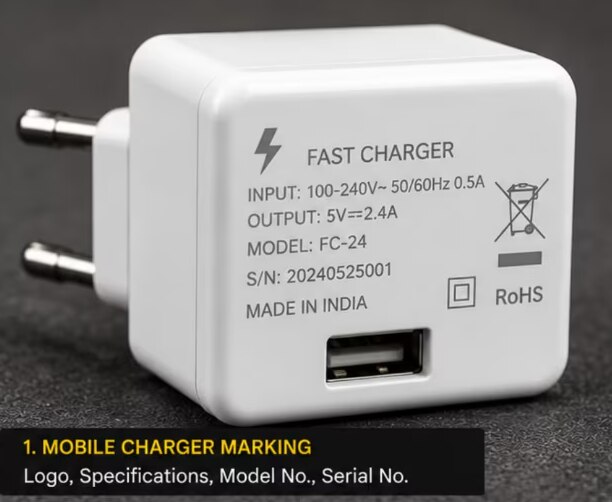
Printed ink, painted graphics and adhesive labels fail when charger housings face rubbing, heat, solvents or repeated handling. You will learn how to match the laser method to the housing, position the mark safely, prepare readable artwork and verify that logos, serial numbers and codes remain legible after production.
Key takeaways
- Match marking settings to the charger housing material.
- Control heat, focus and placement before production marking.
- Use bold, simple artwork for readable small charger logos.
- Test marks against rubbing, heat, flexing and cleaning exposure.
Why Charger Logos Fade and What the Laser Changes
Ink, paint and adhesive labels disappear for different reasons: ink rubs away from hand oils and friction, paint loses adhesion or chips at an edge, and labels peel when heat, dust or flexing weakens the adhesive.
A printed logo can look sharp while sitting entirely on the surface, so repeated plugging, pocket contact and cleaning gradually remove it.
Laser marking changes the housing or its coating instead of adding a separate label. The beam can alter compatible plastic beneath the surface, or remove selected layers to reveal a contrasting colour.
| Option | What changes | Result |
|---|---|---|
| Surface colour change | Carbonisation darkens compatible plastic; foaming creates a light, raised mark | Contrast without cutting deeply into the housing |
| Engraving | Material is physically removed to form a recess | A tactile, durable mark when the housing tolerates depth |
| Coating removal | Ablation strips paint or exposes a contrasting underlayer | Strong contrast on painted or layered surfaces |
The correct effect depends on the polymer, pigment, coating and energy delivery. Excessive energy can melt an edge, raise a burr or create soot; insufficient energy leaves a shallow logo that fails after rubbing. These are common electronic laser marking problems.
Approve permanence with abrasion, suitable solvent exposure and repeated-handling tests, not a photograph. Check the serial number after cleaning and assembly too, because a high-contrast mark is not automatically a durable one.
Match the Laser Process to the Charger Housing
Approve the resin grade and surface finish, not merely the charger model name. ABS, polycarbonate, PC/ABS, nylon, aluminium, painted plastic and anodised aluminium absorb laser energy differently.
| Material or surface | Marking response | Main risk |
|---|---|---|
| ABS | Carbonisation gives dark contrast; ablation suits coated parts | Excess energy scorches edges |
| Polycarbonate | Foaming or controlled colour change can work | White grades can yellow or melt |
| PC/ABS blend | Requires a blend-specific recipe | Black ABS settings can burn white PC/ABS |
| Nylon | Colour change or engraving is possible | Heat can distort the housing |
| Aluminium | Engraving or surface colour change works | Bare metal settings can damage plastic |
| Painted plastic | Ablation exposes the layer below | Thin or weak paint can lift around the mark |
| Anodised aluminium | Laser removal reveals bright aluminium | Uneven anodising causes patchy contrast |
Pigment, flame retardant, recycled content and gloss alter absorption and heat flow. A recipe proven on black ABS can scorch white PC/ABS because the pigment and resin reflect and retain energy differently. Coating thickness also decides whether ablation reveals a clean underlayer or leaves a fragile, incomplete logo.
Before choosing settings, record:
- Moulding or material code and product specification
- Colour, gloss level and coating type
- Cross-section from a spare housing, where available
- Resin lot or coating lot
For mobile charger logo marking in Noida, ask Laser Job Services for material-specific test coupons. Retain the approved wavelength, focus and recipe against that resin and lot; do not approve an entire product family by name alone.
Control Heat, Focus and Placement Before Marking
Melted plastic, warped housings and weak contrast usually come from excess heat or an oversized, poorly positioned spot. Pulse duration, power, marking speed, line spacing and pass count control heat accumulation; focus controls spot size. Shorter pulses, faster movement, wider spacing or several lower-energy passes can reduce damage, but no universal setting suits every housing.
1. Run trials on the actual charger housing, not only on a metal coupon or a different resin. Compare contrast, edge sharpness, raised burrs, warping and filler exposure, then record the approved recipe and its laser wavelength.
2. Hold every part in a fixed nest with one defined orientation. Set and record the focal-height tolerance; hand placement, a tilted fixture or housing shrinkage can widen strokes, alter spacing and make serial numbers unreadable.
Keep the mark away from ventilation slots, USB ports, cable-contact areas, seams, snap-fits, insulation barriers, safety labels, rating plates and curved edges.
3. Use fume extraction close to the marking zone and clean the focusing lens on a defined schedule. Dust changes delivered energy and spot quality, while extracted debris that settles on the part can produce uneven contrast.
After marking, remove loose carbon, ablated coating and soot before assembly. Residue can enter USB ports, contaminate cable-contact areas, reduce QR contrast or resemble fading in the field. Inspect the mark under consistent lighting and magnification for distortion, debris and thermal damage.
These checks address common electronic laser marking problems and mobile charger laser marking for problems in Noida.
Prepare Artwork That Stays Readable on a Small Charger
Small marks fail when the design asks the laser to reproduce detail smaller than its spot or leaves no tolerance for moulding variation. Set the limits from marked samples, not from a font-size guess.
1. Run a material trial with the actual housing finish and process recipe. Record the smallest readable character height and stroke width, then use those values as production minima for mobile charger serial number marking. Reject hairlines, tightly packed fonts and counters that close after marking.
2. Simplify logos before exporting vector artwork. Remove tiny text, narrow gaps and decorative detail that cannot survive the laser spot. Keep characters and symbols away from edges, seams, snap-fits and moulding transitions, where focus and surface height change.
3. Size a QR code or Data Matrix for the verifier, not merely for a smartphone camera. Specify uniform cell dimensions and a measured quiet zone around every side; clipped finder patterns or crowded cells can prevent decoding even when the mark looks sharp.
A flat panel beats a glossy curve because curvature changes focus and glare hides contrast.
4. Enlarge the code or move it to a flatter area before increasing power. More energy can widen cells, scorch plastic or create debris without correcting geometric distortion.
For charger qr code marking in noida, treat a phone scan as a functional check only; use controlled verification under ISO/IEC 15415 or ISO/IEC 29158, selecting the method for the marked-part application. Record cell uniformity, contrast, finder-pattern condition, quiet-zone clearance and the grade under fixed lighting and imaging.
Prove the Mark Will Survive Production and Use
A single attractive photograph proves only that one mark looked good once. Qualification must prove repeatability, traceability and resistance after assembly and handling.
- Generate serials from a controlled data source and compare the job file before marking. The control must reject duplicates, missing numbers, malformed prefixes and any mismatch between human-readable text and encoded data.
- Record the housing material, moulding-lot identification, laser wavelength, recipe, fixture, focal-height setting, sample images and serial-data range. Include the QR or Data Matrix verification result; charger QR code marking in Noida should use controlled verification, not a phone camera alone.
- Clean the part and recess, then inspect for loose carbon, ablated coating and debris. Dust on the lens or weak fume extraction can redeposit plastic and cause inconsistent contrast across a batch.
- Test representative samples with abrasion, an appropriate solvent and repeated handling. A dark mark can still be shallow, and marks that pass inspection before assembly can distort when a snap-fit closes or a seam compresses them.
- Investigate mobile charger laser marking for problems in Noida by separating causes: check lens cleanliness and material lots for contrast variation, clean recesses for debris, change inspection angle or lighting for glare, and compare pre- and post-assembly images for distortion.
Accept the lot only when data, code verification, appearance and durability meet the signed specification. Rework rejected parts only after identifying the cause; otherwise quarantine them and repeat qualification.
Frequently asked questions
Why do mobile charger logos and serial numbers fade?
Ink rubs away from hand oils and friction, paint chips when adhesion fails, and labels peel as heat, dust or flexing weakens the adhesive. Laser marking changes the housing surface instead of adding a separate layer.
How do you choose a laser process for a charger housing?
Identify whether the housing is plastic, coated metal or another material, then match the wavelength, power, speed and pulse settings to that surface. Test for contrast without warping, burning or weakening the housing.
What must you control before marking a charger?
Control heat buildup, keep the surface at the correct focal distance, and use a fixture that holds each charger in the same position. Confirm the logo, serial number or QR code lands in the approved area.
How should artwork be prepared for a small charger?
Use simple shapes, sufficient stroke width and strong contrast. Remove unnecessary detail, check the smallest text at actual mark size, and verify that QR modules remain distinct after marking.
How can you prove a charger mark will survive use?
Test marked samples for rubbing, hand oils, heat exposure, flexing, cleaning and repeated handling. Scan QR codes and verify serial numbers after testing, then record the settings and inspection results.
Keywords